




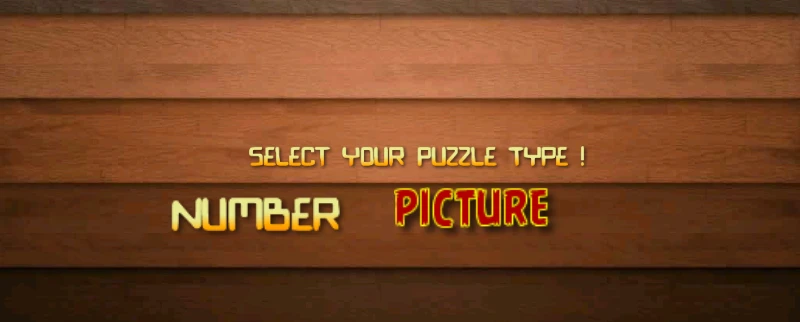
As you create sophisticated games, your games will need to have a “landing” page or menu page with nice graphics and a button or two to access the main sections of the game. Such buttons popularly are the “start” , “settings” , “game mode” etc . In this tutorial post we create a simple landing page (game menu) which a couple buttons that link to other scenes within our game.
This post assumes you have reviewed part 1, part 2 and part 3 of building a slider puzzle game using cocos2d for android. If you havent, would be great to review them before completing this tutorial.
Create the Menu Layer
Just as we created our main GameLayer in a separate java file, we also create MenuLayer.java which extends CCLayer. Next we a dd the scene method which initializes the layer.
public class MenuLayer extends CCLayer {
private static CGSize screenSize;

CCBitmapFontAtlas statusLabel ;

float generalscalefactor = 0.0f ;
public static boolean gameover = false ;

public MenuLayer () {

this.setIsTouchEnabled(true);
}

public static CCScene scene()
{
CCScene scene = CCScene.node();
CCLayer layer = new MenuLayer();
scene.addChild(layer);
return scene;
}
Create Text Based Menus
To create a text based menu item, we create a bitmapfontatlas label and assign it as a child object of a ccmenu object . In our menu layer above, we add the following
CCBitmapFontAtlas label = CCBitmapFontAtlas.bitmapFontAtlas("Number", "bionic.fnt");
CCMenuItemLabel lableitem = CCMenuItemLabel.item(label, this, "numberCallback");
lableitem.setScale(1.4f *generalscalefactor);
CCMenu resumemenu = CCMenu.menu(lableitem);
resumemenu.setPosition(CGPoint.make(screenSize.width / 3* generalscalefactor, screenSize.height/2*generalscalefactor));
addChild(resumemenu,800) ;
We also specify the function that’s called when the menu item is clicked or tapped.
public void numberCallback(Object sender) {
//launch the number game scene
CCScene scene = GameLayer.scene(); //
CCDirector.sharedDirector().runWithScene(scene);

}
Create Picture Based Menus
To create a text based menu item, we create a bitmapfontatlas label and assign it as a child object of a ccmenu object
//Add Picture based menu item. Picture Puzzle
CCMenuItemImage backbtn = CCMenuItemImage.item("picture.png", "picture.png",this, "pictureCallback");
backbtn.setScale(1.6f *generalscalefactor);

CCMenu backmenu = CCMenu.menu(backbtn);
backmenu.setContentSize(backbtn.getContentSize());
backmenu.setPosition(CGPoint.make(0, 0));
backbtn.setPosition(CGPoint.make(resumemenu.getPosition().x + label.getContentSize().width*1.4f *generalscalefactor + backbtn.getContentSize().width/2 * generalscalefactor, screenSize.height/2*generalscalefactor ));

addChild(backmenu, 100);
And the callback function is given below. Dont forget to to add your picture.png file to the assets folder.
public void pictureCallback(Object sender) {

//launch the picture game scene
CCScene scene = GameLayer.scene(); //
CCDirector.sharedDirector().runWithScene(scene);

}
Next Steps
Add a horizontal sliding game menu. Hint : this can be done using the CCScrollView class.
Gimme that updated code
The PuzzleGame code on github has been updated to add the menu item. You may update your clone .
 Setting up Cocos2D for Android, in Eclipse
 How to Slide a Sprite around based on touch/drag input in Cocos2D for Android
 Step by Step Guide on How to build your first Slider Puzzle game in Cocos2d for Android – Part 1
 Step by Step Guide on How to build your first Slider Puzzle game in Cocos2d for Android – Part 2

great tutorial thx for sharing!
can you give me some tips for implementing a loaderscreen or a progressbar during loading the tiles?
Hi JPam,
Normally, loaderscreens are displayed when some resource-intensive background processes are being carried out. In most games, especially on first launch, a database of content and settings are usually initialized and a loaderscreen is shown whilst doing this.
A similar concept is used on one of my games – puzzbox africa ..
You can do this by showing a layer … splashlayer (maybe with some text .. “preparing database”) and then load your GameLayer when the processing is finished.
//===========snippet =======================
public class SplashLayer extends CCLayer {
public SplashLayer () {
loadDatabase() ;
}
}
private void loadDatabase(){
//Splash layer is currently displayed
//Code to open database
//Make calls to a web services
// complete all heavy lifting processes that need to be completed before proceeding.
//finally load the game layer
CCScene scene = GameLayer.scene();
CCDirector.sharedDirector().runWithScene(scene);
}
//===========snippet =======================
What kind of process occurs when you show your loaderscreen ? What tiles are being loaded ?
Hope my answer has been helpful
V.
thx for your repley,
i trying to make it a picture puzzle, butt on my low buget phone it takes a while to load the picture, so my goal was i add a progressbar at the menuLayer, but it freezes until the picture is loaded !
mybe because it’s in the same thread.
is it possible to create a new thread for the MenuLayer?
could not find any info on google about cocos2d threads
HI Jpam,
I think I understand the situation better now. I do my testing using a samsung galaxy s2 .. a fairly powerful device and I can understand the performance lag on lower end devices.
To clarify a bit more,
Does this freezing occur when you load up the regular number puzzle ? Or does it occur only when you load up the picture puzzle ? My guess is that the process of creating bitmap from your image asset guzzles up memory hence the freeze …
So, you might want to put the getBitmapFromAsset(String strName) function in a thread . Whilst this is being done … you may create a label on the same layer and update its text “loading image” ..
Now .. about creating a thread, I think regular thread creation in android should work. Here’s a snippet of what that function could look like
private void getBitmapFromAsset(String strName) throws IOException
{
new Thread(new Runnable() {
public void run() {
AssetManager assetManager = CCDirector.sharedDirector().getActivity().getAssets();
InputStream istr = assetManager.open(strName);
bitmap = BitmapFactory.decodeStream(istr);
}
}).start();
}
Experiment with the tutorials here http://developer.android.com/guide/components/processes-and-threads.html.
Feel free to commit your changes to the PuzzleGame repository on github.
https://github.com/chuvidi2003/PuzzleGame
E.g you can commit it as ThreadedPictureGameLayer.java.
V.
Hi, How can I enable an edit box in CCLayer object user want to insert text? Is there any easy way in Cocos-2d Android Java platform?
You can use a popup with an android textedit control. However. note that you will have to use the original activity class
See this article ..
http://denvycom.com/blog/anatomy-of-a-cocos2d-game/
Great Tutorial ! by the way how can I use Activity class so I can implement methods like onCreate onClick and other methods of Activity class? Because I tried to put CScene() but it said that cannot convert my class into CCLayer? thank !
Hi,
You can do that from the MainActivity Class ..
https://github.com/chuvidi2003/PuzzleGame/blob/master/src/com/example/puzzlegame/MainActivity.java
-V
as far as I know the class that will be call needs a method public static CCScene scene() to response. but when I declare it on my menu class that extends on Activity Class it gives an error. it said that type mismatch cannot convert Menu to CCLayer. my codes can be found on http://stackoverflow.com/questions/25083021/android-extend-2-classes.
Hope this would works because im a great fan of this engine. thanks and godbless sir.
From what you have explained, here is what I can infer
1.) you already have an android App …
2.) But you would like to add a sliding menu to it.
3.) You would also like to launch a new Activity each time any of the menu buttons is clicked .
is this correct ?
A few things though – CClayer or CCScene cannot extend Android Activity or use any of its methods.
However it is possible for you to add a CCLayer on one of your Android Activities and implement the menu effect. http://denvycom.com/blog/anatomy-of-a-cocos2d-game/
Maybe you can share more code, or take out some time to add significantly more detail to the question on stackoverflow. This way, I can atleast understand your use case and provide some help.
Regards
-V
Yes that’s correct. but how can I call another android class whenever i want to click the buttons on the sliding menu of cocos2d?
Is there anyway that I can load another activity XML file (from layout), when I click on the button, you taught above?