



Its important to understand the different components of your game and what goes where! For the most part, you will be dealing with layers (CClayer class) adding nodes, sprites, animations etc to it. This is where the magic happens. But its also important to realize that all of this happens on a single android Activity (a page) which is your primary access point to the android operating system context. All the screen changes are all done by the CCDirector class which swaps in (and out) different scenes and layers.
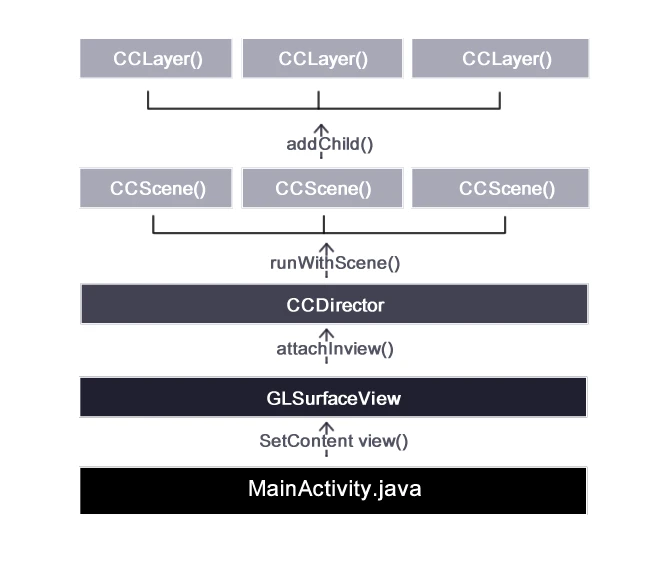
This is why the Android Back button (and a few other things) will not work out of the box in switching between layers/scenes because as far as Android is concerned, only a single Activity page is in view. Pressing the back button will exit the application.
Knowing this would help in creating simple solutions to issues you might face e.g implementing the back button , getting the android context, launching intents etc.
MainActivity – Android Activity
This is the entry point of your application and is the first page initialized when the game is launched. In regular android apps, the interface of this page is laid out in an xml file which is attached to the Activity using the setContentView method. Instead in your game, the interface is connected with GLSurfaceView class for rendering animations (adding your layers etc).
You can get the Android application context required to access many built in android functions from this activity. It is on this page that you can write code to listen for keypress (e.g backbutton) , intent activityresult , manage application lifecycle (saving and loading game state) etc .
GLSurfaceView
All of the smooth buttery animations run by cocos2D uses the OpenGL ES standard and the GLSurfaceView class provides the glue code to connect OpenGL ES to the android View system. Enables OpenGL ES work with the Activity life-cycle. Makes it easy to choose an appropriate frame buffer pixel format. Creates and manages a separate rendering thread to enable smooth animation. GLSurfaceView is the base for building applications that use OpenGL ES for part or all of its rendering.
CCDirector
Works like a real director .. its the class that creates and handles the main Window and manages how and when to execute the Scenes. The CCDirector is also resposible for:
– initializing the OpenGL ES context
– setting the OpenGL pixel format (default on is RGB565)
– setting the OpenGL buffer depth (default one is 0-bit)
– setting the projection (default one is 3D) setting the orientation (default one is Protrait)
CCScene
CCScene is a subclass of CCNode that is used only as an abstract concept. CCScene and CCNode are almost identical with the difference that CCScene has it’s anchor point (by default) at the center of the screen. For the moment CCScene has no other logic than that, but in future releases it might have additional logic. It is a good practice to use and CCScene as the parent of all your nodes.
CCLayer
CCLayer is a subclass of CCNode that implements the TouchEventsDelegate protocol. All features from CCNode are valid, plus the following new features:
It can receive Touches It can receive Accelerometer input CCLayer.h.
Implementing the Back Button
Currently, to implement the back button in my Ccocs2D games implement some state tracking within my MainActivity.java file to know which layer to display when the back button is pressed. In MainActivity.java, within the onKeyPress method, you can listen for a back button press event and then show the appropriate layers. You may implement a global stack data structure which keeps track of the most recent layer . When the back button is pressed, the current layer is replaced with the one beneath it.



Thankyou for sharing.
Thank you for appreciating. I’m glad it’s helpful to you.
V.
How to take screen shot in cocos2d android? Thanks