

Up until now, there hasn’t been a documentation of the Tizen Wearable OS platform which runs on gear 2 devices. Samsung has just released a Programming Guide (which is hardly matured yet) , but definitely provides more information. The Samsung developer team have been working real hard .. because there are a few new features documented in addition to the basic stuff . You can get on the Samsung Developer page or download it directly ..
New Features
Gear Widget Settings
If you wish to use Gear Manager to manage the configuration of your wearable-side application, include a settings.xml file in the settings folder in the wearable-side widget. This file tells Gear Manager what settings information is required for a wearable-side widget. Gear Manager uses the XML configuration file for launching the basic or complex settings UI. The XML settings file uses a String ID format to support multiple languages. To support multi languages for your application, add the required strings in all the supported languages. The file name must be settings.xml. The idea is that after you add settings.xml to your gear app, it generates the settings on gear manager when the widget is installed.
Here’s what the settings could look like in Gear manager settings.
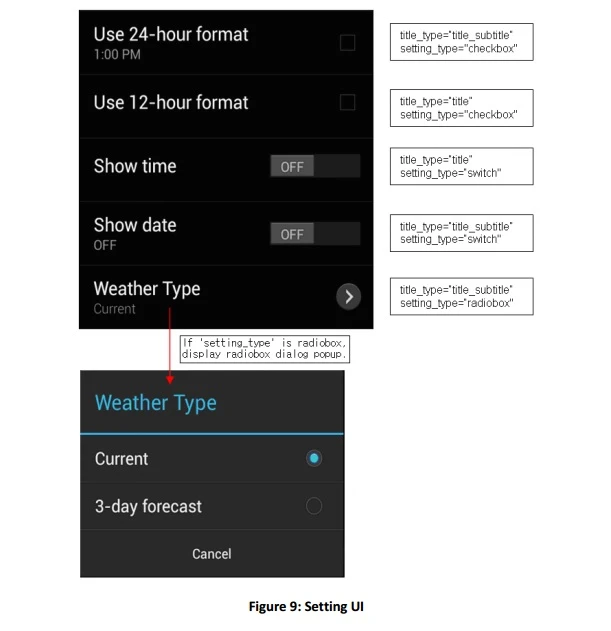
There are two types of settings your app can have .. a basic and a complex setting. More details in section 4 of the API documentation.
Notifications and Auto Launching Gear Side Apps
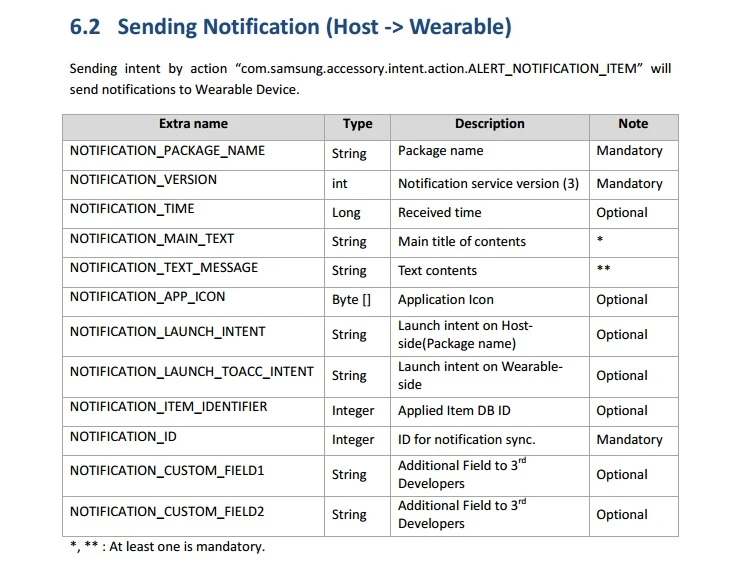
E.g Section 6.1 details how to send notifications from the host app to the gear device directly. It also indicates that the host app can get an acknowledgement when the notification is opened on the gear. Sounds like a nice feature to have. You can configure these notifications such that they appear only on the gear device too .
Here are the settings which the notification intent can take
![Getting Heart Rate Data for your Samsung Gear 2 Apps [Sample Code]](/blog/wp-content/uploads/2014/10/gearlive-e1413099829412-150x150.webp)